Quick Takeaways (TL;DR):
- Essentials License: $70 per user/month for core financials and supply chain.
- Premium License: $100 per user/month for manufacturing and service management.
- Team Member License: $8 per user/month for basic read/approve access.
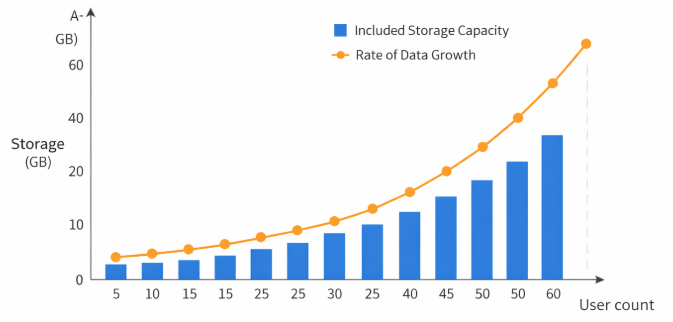
- Storage: 80 GB base included; $10 per GB for additional capacity.
- Hidden Costs: Factor in $15,000–$50,000 for standard implementation.
Table of Contents
1. Understanding the Three Licensing Tiers
Microsoft offers three primary ways to license individuals within your organization. Unlike legacy ERP systems, there are no “concurrent” users; every person who logs in needs their own identity. This ensures security and auditability across all transactions.
Microsoft Dynamics 365 Business Central Essentials
At $70 per user/month, the Essentials license is the most common starting point. It covers the vast majority of business functions including finance, sales, purchasing, inventory, and project management. Small to medium-sized businesses in the professional services or distribution sectors typically find everything they need here. It allows for unlimited companies and is fully extensible through the Microsoft AppSource.
Microsoft Dynamics 365 Business Central Premium
The Premium license costs $100 per user/month. It includes everything in Essentials plus two critical modules: Service Management and Manufacturing. If your business needs to manage production orders, Bill of Materials (BOMs), or specialized field service scheduling, Premium is a requirement. Note that you cannot mix Essentials and Premium users in the same environment; if one user needs Premium, all full users must be Premium.
Team Member Licenses
At $8 per user/month, Team Member licenses are designed for “light” users. These employees can read data across the system but have limited write access. They are perfect for warehouse staff who only need to update stock counts, or managers who only log in to approve purchase requisitions or timesheets. Utilizing Team Member licenses effectively is the best way to lower your total monthly bill. For specialized guidance on structuring these roles, many firms seek Dynamics 365 consulting services.
3. Real-World Implementation Budgeting
The license is just the ticket to the game; the implementation is the game itself. Based on 2026 industry data from sources like Forrester Research, implementation costs usually range from 3 to 5 times the annual licensing cost. If you spend $20,000 a year on licenses, expect an implementation between $60,000 and $100,000.
Small Business/Standard Implementation
For companies with 5-15 users and no complex manufacturing, a “templated” implementation is possible. This usually costs between $15,000 and $35,000. It involves setting up the chart of accounts, importing master data (customers/vendors), and basic training. This is common for those moving from QuickBooks or Xero.
Mid-Market/Complex Implementation
If you are managing multiple entities or complex intercompany logistics, costs rise. Organizations frequently look at automating intercompany transactions in Business Central to save labor costs, but the initial setup for these workflows requires specialized expertise. Expect budgets between $50,000 and $150,000 for these projects. This includes deep process mapping and custom Power BI reporting.
Implementation Cost Checklist
- [ ] Data Migration: How many years of historical data? (Limit to 2 years to save cost).
- [ ] Integrations: Are you connecting to Shopify, Salesforce, or a custom 3PL?
- [ ] Customizations: Can you use “Out of the Box” features instead of custom code?
- [ ] Training: Do you need “Train the Trainer” or full staff training?
- [ ] ISV Add-ons: Do you need specialized tools like Continia or Insight Works?
4. Device vs. User Licensing
For many years, Microsoft only offered user licenses. However, for specialized scenarios like retail points of sale or warehouse terminals, the Device License at $40 per device/month remains a viable option. This is not tied to a specific person. Any number of employees can use that specific terminal. This is highly effective for companies with high turnover in warehouse roles or those operating 24/7 shifts where multiple people use the same workstation.
It is important to note that device licenses have restricted functionality compared to Essentials or Premium user licenses. They are strictly for shop floor or retail operations. If the user needs to perform back-office accounting or complex procurement, a named user license is still required. When you evaluate an ERP implementation partner, ask them for a “Licensing Optimization Audit” to see if device licenses can save you money.
5. How to Save on Licensing During Migration
If you are currently on an older Microsoft platform like Dynamics GP or SL, you may be eligible for the Bridge to the Cloud 2.0 promotion. This program, which has been extended through various iterations into 2026, often offers a 40% discount on Business Central licenses for up to three years. This significantly lowers the barrier for those following a migrate from GP to Dynamics 365 guide.
Another area of savings is automation. By automating bank reconciliation in Dynamics 365 Business Central, companies can often reduce the number of full-seat accounting users required, shifting some oversight roles to the cheaper Team Member seats. Furthermore, in the Dynamics vs. Odoo debate, Business Central often wins on total cost of ownership for larger teams because of the deep integration with Microsoft 365 (Outlook/Excel), which reduces training and third-party connector costs.
6. Frequently Asked Questions
Can I mix Essentials and Premium licenses?
No. Microsoft requires that all “Full Users” within a single tenant be on the same tier. You can, however, mix Full Users (Essentials or Premium) with Team Member licenses.
Is there a minimum seat requirement?
Technically, the minimum is 1 user. However, most Microsoft Dynamics 365 consulting services providers recommend a minimum of 3 to 5 users to make the implementation investment worthwhile.
Are external accountants free?
Yes. Microsoft typically provides 3 free External Accountant licenses per tenant. These do not count against your paid user total and allow your CPA or outside firm to access your books for auditing and month-end closing.
How often does Microsoft increase prices?
Historically, Microsoft adjusts pricing every 3–5 years to account for inflation and added features. The last major adjustment was in late 2023, so prices in 2026 are relatively stable, though checking with a partner for regional currency adjustments is advised.
What happens if I stop paying my subscription?
If you cancel your subscription, your data is kept in a “read-only” state for 90 days. After that period, Microsoft reserves the right to delete the data permanently. Always ensure you have a data retention plan if you plan to migrate away.

